PickleTown.
[01] Background
Pickleball courts in Taiwan are scattered across dozens of systems — some listed in LINE groups, some on government portals, some nowhere at all. There was no single place to find a court, check availability, or connect with players nearby. On top of that, the sport requires at least four players per game, which makes it uniquely hard to just "go play" on a whim. PickleTown was built to solve both problems from scratch — as a solo project covering product design, iOS (SwiftUI), Android, the web platform (Next.js + Hono), and the entire self-hosted backend infrastructure (PostgreSQL + Redis + WebSocket on Zeabur).
[02] Branding
The PickleTown brand is built around energy, community, and motion. The primary color — a vibrant orange (#f97316) — reflects the sport's fast-paced and social nature. On iOS, the visual language adopts the iOS 26 Liquid Glass design system, where translucent surfaces and dynamic blur effects create a premium, tactile feel. The "Solar Glass" concept unifies both platforms: warm orange as the brand anchor, with glass-like surface treatments that feel alive and interactive.
[03] Goals
Aggregate Fragmented Court Information
Pickleball courts in Taiwan are spread across government portals, social media groups, and word of mouth — with no unified, searchable source. The goal was to build a community-driven court database where players could discover courts by distance, view facilities and photos, and contribute new locations — all in one place.
Solve the "Need 4 Players" Problem
Pickleball requires a minimum of four players, making casual pickup games unusually hard to organize. Players constantly struggle to fill a session — especially when it's just two or three friends. PickleTown's session system lets players publicly post a game, specify skill level and fee, and let others discover and join directly from a live map.
Quick Match for Instant Pairing
After launch, it became clear that session posting still required too much coordination. Players wanted a faster way to get into a game. Quick Match was introduced as an intent-based pairing system — players signal they're ready to play, and the system matches them with others at nearby courts at the same time, reducing the coordination overhead to near zero.
[04] Solutions
Community Court Database with MapKit
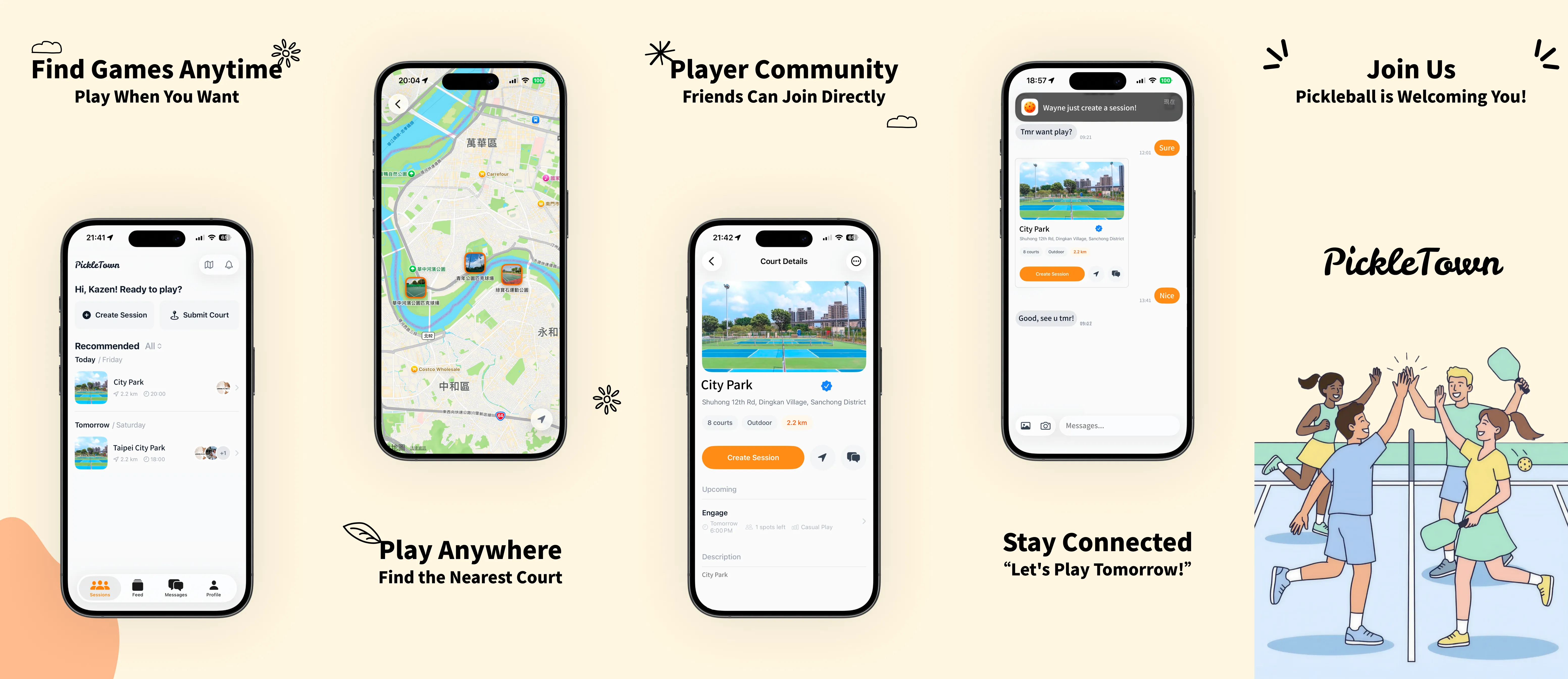
Built a court discovery system using Apple MapKit and CoreLocation that shows nearby courts sorted by real-time distance. Each court entry includes court count, facility tags, indoor/outdoor type, free/paid status, and photos — all user-submitted. Players can add new courts via an in-app form with photo uploads and location pinning. Every court also has its own persistent chat room.
Session Engine with Smart Filtering
Designed a session lifecycle system covering creation, join/leave, member roster management, skill-level and fee tags, and a dedicated group chat per session. Sessions surface on both a map view and a list view with smart date labels (Today / Tomorrow / full date). A rate-limiting and anti-abuse layer prevents spam and fake sessions.
Quick Match — Intent-Based Pairing
Implemented a quick match system where players broadcast availability with a court, time window, and skill level. The backend matches overlapping intents and notifies both parties in real time via WebSocket push. This cut the average time-to-game for solo players significantly and became one of the most-used features post-launch.
Self-Hosted Real-Time Stack
Engineered a real-time messaging system from scratch: standalone WebSocket server (Node.js + ws), Redis pub/sub for multi-instance fanout, and PostgreSQL for message persistence — all deployed on Zeabur with no Firebase or Supabase Realtime dependency. The same infrastructure powers private chats, session group chats, and court chat rooms.
Full-Stack Monorepo Across 3 Platforms
Structured the entire product as a monorepo with iOS (SwiftUI + XcodeGen), Android, and Web (Next.js 16 + Hono + Drizzle ORM + Bun) sharing a single backend API. Auth uses Better Auth for web sessions and JWT for mobile clients. Database schema changes are managed via a custom sync mechanism for zero-downtime migrations on Zeabur. A complete SwiftUI component library implements iOS 26 Liquid Glass — GlassIconButtons, AvatarStackView, SkeletonView, FlowLayout — with all design tokens centralized in dedicated enums.